














What Is CAD? CAD Software, Applications & How to Choose
What is CAD? Learn about 2D and 3D CAD software, key applications and benefits, and how to choose the right CAD solution for design and manufacturing.
CAD (Computer-Aided Design) is a technology that enables engineers and designers to create, modify, and manage 2D drawings and 3D models with a high level of accuracy.
Today, CAD is widely used across mechanical engineering, automotive, aerospace, electrical and electronics, construction, and many other product development fields. Beyond replacing manual drafting, CAD software helps companies accelerate design, reduce errors, and connect design data with CAE simulation and CAM manufacturing processes.
However, not all CAD software is the same. Depending on the product, design complexity, and engineering workflow, a company may require 2D CAD, 3D CAD, or a more advanced design system.
This article explains what CAD is, the main types of CAD software, where CAD is used, and how companies can choose the right solution for their needs.
1. What Is CAD?
CAD stands for Computer-Aided Design. It refers to the use of computer-based technology to create and modify technical drawings or product models in a digital environment.
Instead of manually redrawing a design whenever a change is required, CAD software allows engineers to work directly with 2D or 3D design data.
Depending on the software, CAD can support:
- Creating 2D technical drawings.
- Building 3D product models.
- Designing individual parts and assemblies.
- Checking dimensions, geometry, and interferences.
- Updating designs when requirements change.
- Preparing design data for CAE simulation or CAM manufacturing.
CAD therefore goes beyond replacing traditional drafting. It has become an important part of modern product design and development workflows.
2. What Are the Main Types of CAD Software?
CAD software covers a wide range of design requirements. A tool designed primarily for 2D drafting may not be suitable for complex product design or large assembly management.
Based on design methods and applications, CAD software can generally be divided into several groups.
2.1. 2D CAD – Technical Drawing and Drafting
2D CAD focuses on creating and editing drawings on a two-dimensional plane, including part drawings, diagrams, layouts, and assembly drawings.
This type of CAD is commonly used when users need to:
- Create and edit technical drawings.
- Define dimensions and specifications.
- Standardize design documentation.
- Exchange 2D data with customers or suppliers.
Popular 2D CAD solutions include AutoCAD, ZWCAD, and DraftSight.
2.2. 3D CAD – Part and Assembly Design
As products become more complex, 3D CAD allows engineers to create more realistic product models and better understand the relationships between individual components.
These systems typically support solid modeling, parametric design, assembly design, and the generation of technical drawings from 3D models.
For example, CADmeister is developed specifically for mold design and related mold manufacturing applications. Other solutions such as SolidWorks, Creo, and Inventor are also widely used for mechanical design.
2.3. Advanced 3D CAD – Complex Product Design
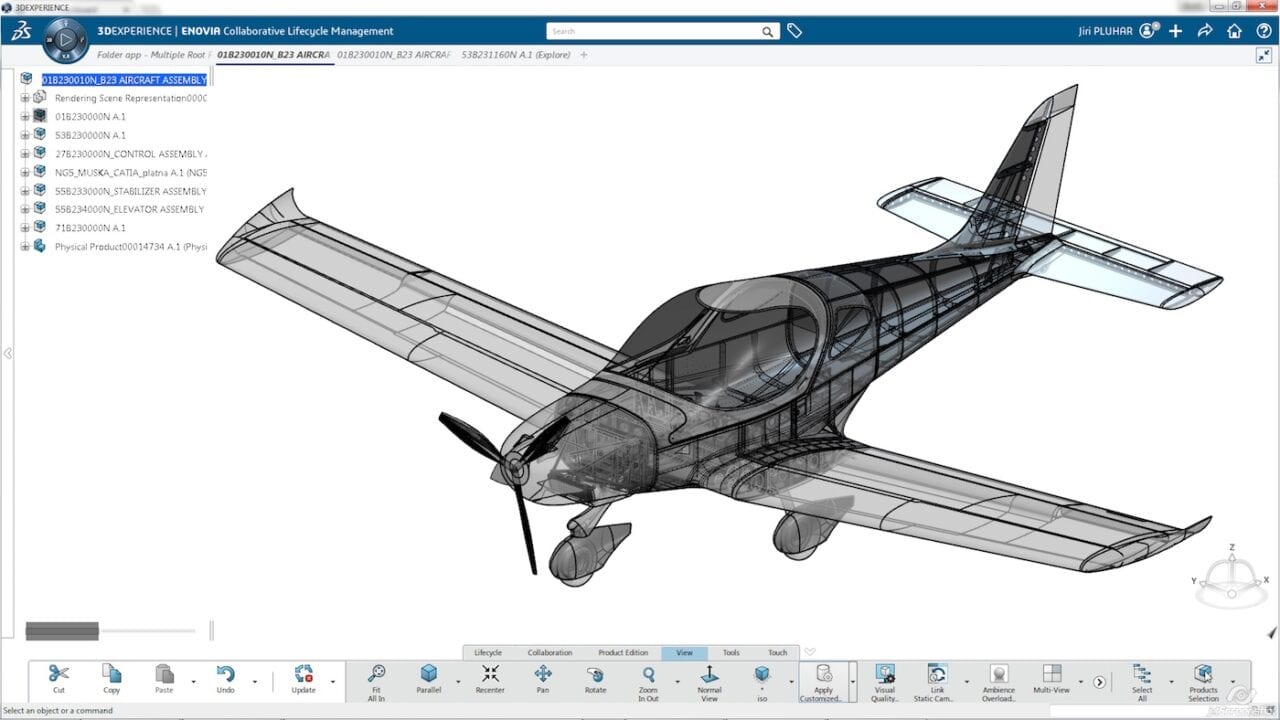
In industries such as automotive, aerospace, and industrial equipment, design requirements often go far beyond basic 3D modeling.
Engineers may need to work with complex surfaces, large assemblies, multiple product configurations, and extensive engineering data.
Advanced CAD systems can support:
- Complex geometry and surface design.
- Parametric modeling.
- Large assembly management.
- Design review and validation.
- Collaboration between engineering teams.
- Connections between design and downstream development processes.
3DEXPERIENCE CATIA is one example of an advanced design solution, alongside systems such as Siemens NX.
2.4. CAD Data Processing and Conversion Tools
In real-world engineering environments, customers, suppliers, and internal teams do not always use the same CAD system.
When design data is exchanged between different systems, geometric errors or compatibility issues may occur.
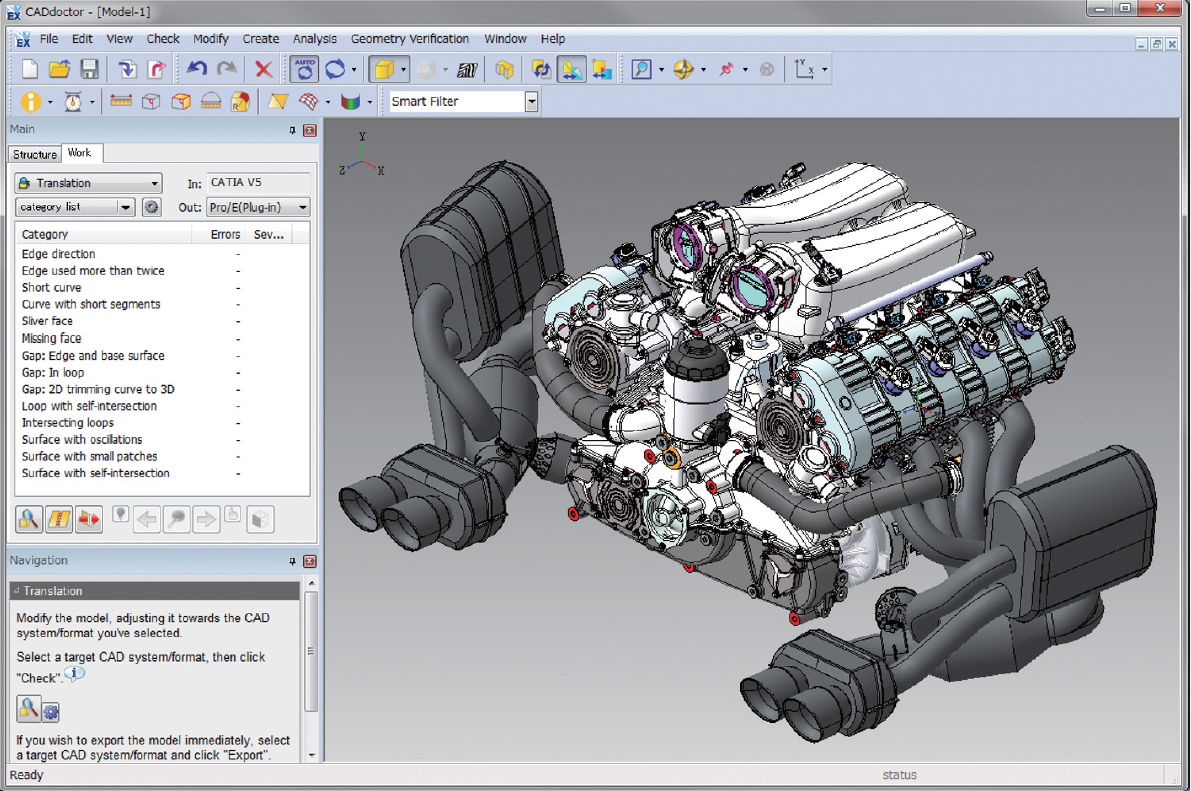
Tools such as CADdoctor help companies:
- Detect and repair geometry errors.
- Convert data between different CAD systems.
- Maintain the integrity of 3D models during data exchange.
3. What Are the Benefits of CAD Software?
The value of CAD goes beyond helping engineers “draw faster.” When properly integrated into a product development workflow, CAD can improve design speed, data accuracy, and collaboration between different engineering processes.
3.1. Faster Design and Modification
Functions such as copy, parametric design, component libraries, and design reuse can reduce repetitive engineering work.
When product requirements change, engineers can update the existing model instead of recreating the design from scratch.
3.2. Improved Accuracy and Fewer Design Errors
CAD helps engineers control dimensions, geometry, and relationships between components throughout the design process.
Depending on the CAD system, engineers can also perform interference checks or review assembly conditions before moving the product to downstream processes.
3.3. Easier Design Modification and Reuse
Existing CAD models can be modified and reused to develop new product variants.
This is particularly useful for companies that frequently create new products based on existing designs, standard components, or common assemblies.
3.4. Better Collaboration and Data Exchange
CAD data can be shared between engineers, departments, customers, and suppliers.
Exchange formats such as STEP, IGES, and DXF also enable data to move between different systems, although compatibility depends on the software and the type of design data involved.
3.5. Connection with Simulation and Manufacturing
Another major advantage of CAD is its ability to provide design data for downstream processes such as CAE simulation and CAM manufacturing.
As a result, CAD data does not have to remain isolated within the R&D department. It can continue to support product evaluation, validation, and manufacturing preparation.
4. Which Industries Use CAD?
CAD is used across a wide range of industries, although design requirements vary significantly depending on the product.
4.1. Mechanical Engineering and Machinery
Mechanical engineering is one of the most common applications of CAD.
Engineers use CAD to design machine components, molds, equipment, assemblies, and mechanical systems. CAD models can also provide input data for simulation and CNC machining.
4.2. Automotive and Aerospace
Automotive and aerospace products often involve complex geometry and large numbers of components.
CAD is used to design body structures, mechanical components, interiors, and many other product systems. In large development projects, design data may also need to be shared and coordinated across multiple engineering teams.
4.3. Electrical and Electronics
In electrical and electronic product development, CAD can support the design of enclosures, brackets, mechanical layouts, and related components.
Coordination between mechanical and electrical design also helps identify space constraints and potential interference between electronic components and product enclosures.
4.4. Construction and Architecture
CAD is used to create floor plans, elevations, sections, structural drawings, and engineering systems such as HVAC and piping.
Depending on the project, CAD data may also be used alongside BIM processes and tools.

4.5. Medical Devices and Consumer Products
Products such as medical devices, household appliances, plastic enclosures, and consumer goods often require a balance between shape, dimensions, assembly, and manufacturability.
CAD enables engineers to develop and modify product models before moving to validation or manufacturing.
5. What Is the Difference Between CAD, CAE, and CAM?
CAD, CAE, and CAM often appear within the same product development workflow, but each serves a different purpose.
| Technology | Main Role | Example Activities |
|---|---|---|
| CAD | Design | 2D drawings, 3D models, assemblies |
| CAE | Simulation and analysis | Structural, thermal, fluid, and motion analysis |
| CAM | Manufacturing preparation | NC programming, toolpath generation and optimization |
In simple terms:
CAD creates the design → CAE evaluates the design → CAM helps prepare the design for manufacturing.
When data flows effectively between these stages, engineers can reduce unnecessary data recreation, identify issues earlier, and minimize development iterations.
6. How Should Companies Choose CAD Software?
There is no single CAD solution that is suitable for every company.
A business that primarily creates 2D drawings will have very different requirements from a company designing molds, vehicles, or products containing thousands of components.
Before selecting CAD software, companies should consider several questions:
- Does the company mainly require 2D drawings or 3D models?
- How complex are the product geometry and assemblies?
- Does CAD need to connect with CAE, CAM, or PLM?
- Do engineers frequently exchange CAD data with customers and suppliers?
- Does the company need a standalone design tool or an environment where multiple teams can work with product data?
Therefore, software license cost should not be the only consideration. Companies should also evaluate design capabilities, data compatibility, scalability, and integration with existing engineering workflows.
Find the Right CAD Solution for Your Business
CAD is no longer simply a tool for creating drawings. For manufacturing companies, CAD data can become the starting point for downstream activities ranging from simulation and design validation to manufacturing preparation.
Choosing the right CAD solution should therefore consider the product, engineering workflow, existing data, and how the software needs to connect with other systems.
New System Vietnam provides solutions including 3DEXPERIENCE CATIA, CADmeister, and CADdoctor, supporting requirements from product design to CAD data processing and exchange.
👉 Contact New System Vietnam to discuss your engineering requirements and find the CAD solution that best fits your business.
Frequently Asked Questions
What does CAD mean?
CAD stands for Computer-Aided Design. It refers to technology used to create and modify 2D drawings or 3D models in a digital environment.
What is the difference between 2D CAD and 3D CAD?
2D CAD primarily works with drawings on a flat plane. 3D CAD allows engineers to create three-dimensional models, parts, and assemblies, providing a more visual representation of the product.
Are CAD, CAE, and CAM the same?
No. CAD focuses on design, CAE on simulation and analysis, and CAM on manufacturing preparation and programming. CAD data is often used as input for downstream CAE and CAM processes.
Related posts

AI in R&D: What Should Companies Prepare for Effective Implementation?

Can AI Replace Design Engineers? The Future of AI in Engineering

Why Companies Still Experience Errors After Investing in CAD

How to Shorten Product Development Time: 5 Critical Factors Companies Often Overlook